2019-07-23 09:03:47 +08:00
|
|
|
|
# 比 EventBus 更高效的事件总线(BusUtils)
|
2019-07-18 21:54:44 +08:00
|
|
|
|
|
|
|
|
|
|
## 背景
|
|
|
|
|
|
|
|
|
|
|
|
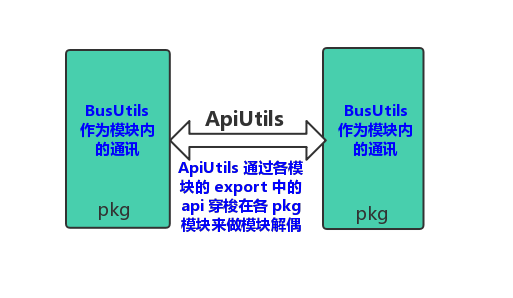
设计这个 `BusUtils` 其实是在做 [ApiUtils](https://github.com/Blankj/AndroidUtilCode/tree/master/plugin/api-gradle-plugin) 时顺手做的,因为两者实现方式基本一致,设计前我也没想着要和 greenrobot 的 `EventBus` 一较高低,但设计完总需要一个对比,所以就拿业界最优秀的事件总线 `EventBus` 比较一下吧,然后就发现我这区区 300 行不到的 `BusUtils` 性能比 `EventBus` 要高出好多,当然,这一切的前提都是在 `BusUtils` 是切实可用并且有效的,它也是一款线程安全的事件总线,这些我都在单测中有做过实际测试的,不吹不擂,后面我们拿数据说话,有小伙伴不相信的话也可以通过下载我的源码来比较即可,单测地址:[BusUtilsVsEventBusTest](https://github.com/Blankj/AndroidUtilCode/blob/master/lib/utilcode/src/test/java/com/blankj/utilcode/util/BusUtilsVsEventBusTest.java),Android 测试地址:[BusCompareActivity](https://github.com/Blankj/AndroidUtilCode/blob/master/feature/utilcode/pkg/src/main/java/com/blankj/utilcode/pkg/feature/bus/BusCompareActivity.kt),`BusUtils` 在 **[AucFrame](https://github.com/Blankj/AucFrameTemplate)** 中的作用就是模块内传值,其扮演的角色如下所示:
|
|
|
|
|
|
|
2019-07-23 09:03:47 +08:00
|
|
|
|
|
2019-07-18 21:54:44 +08:00
|
|
|
|
|
|
|
|
|
|
下面介绍其使用:
|
|
|
|
|
|
|
|
|
|
|
|
|
|
|
|
|
|
## 使用
|
|
|
|
|
|
|
|
|
|
|
|
### 配置
|
|
|
|
|
|
|
|
|
|
|
|
在项目根目录的 `build.gradle` 中添加 `bus` 插件:
|
|
|
|
|
|
|
|
|
|
|
|
```groovy
|
|
|
|
|
|
buildscript {
|
|
|
|
|
|
dependencies {
|
|
|
|
|
|
...
|
2020-11-06 14:28:45 +08:00
|
|
|
|
classpath 'com.blankj:bus-gradle-plugin:latest.release'
|
2019-07-18 21:54:44 +08:00
|
|
|
|
}
|
|
|
|
|
|
}
|
|
|
|
|
|
```
|
|
|
|
|
|
|
|
|
|
|
|
然后在 application 模块中使用该插件:
|
|
|
|
|
|
|
|
|
|
|
|
```groovy
|
|
|
|
|
|
apply plugin: "com.blankj.bus"
|
|
|
|
|
|
```
|
|
|
|
|
|
|
|
|
|
|
|
给你的项目添加 [AndroidUtilCode](https://github.com/Blankj/AndroidUtilCode) 依赖:
|
|
|
|
|
|
|
|
|
|
|
|
```groovy
|
2020-09-08 15:52:50 +08:00
|
|
|
|
api "com.blankj:utilcode:latest.release
|
2019-07-18 21:54:44 +08:00
|
|
|
|
```
|
|
|
|
|
|
|
2019-08-08 04:19:33 +08:00
|
|
|
|
如果你单纯只想引入 `BusUtils` 也是可以的,需要你自己拷贝一份这个类放到你工程里,记得还要拷贝 `ThreadUtils` 哦,然后在 app 下的 `build.gradle` 中 配置 bus 的 DSL 域如下所示:
|
2019-07-18 21:54:44 +08:00
|
|
|
|
|
|
|
|
|
|
```groovy
|
2019-08-08 04:19:33 +08:00
|
|
|
|
bus {
|
2019-07-18 21:54:44 +08:00
|
|
|
|
busUtilsClass "com.xxx.xxx.BusUtils"
|
|
|
|
|
|
}
|
|
|
|
|
|
|
|
|
|
|
|
android {
|
|
|
|
|
|
...
|
|
|
|
|
|
}
|
|
|
|
|
|
```
|
|
|
|
|
|
|
|
|
|
|
|
可以猜测到默认的 busUtilsClass 为 `com.blankj.utilcode.util.BusUtils` 哈。
|
|
|
|
|
|
|
2019-07-19 14:54:34 +08:00
|
|
|
|
如果开启混淆的话还需要配置你的 `BusUtils` 中注解方法的防混淆,如果直接用 **[AndroidUtilCode](https://github.com/Blankj/AndroidUtilCode)** 的话是不需要你配置的,我已经帮你做完了,配置你自己的 `BusUtils` 防混淆应该如下所示:
|
|
|
|
|
|
|
|
|
|
|
|
```java
|
|
|
|
|
|
-keepattributes *Annotation*
|
|
|
|
|
|
-keepclassmembers class * {
|
|
|
|
|
|
@com.xxx.xxx.BusUtils$Bus <methods>;
|
|
|
|
|
|
}
|
|
|
|
|
|
```
|
|
|
|
|
|
|
2019-07-18 21:54:44 +08:00
|
|
|
|
当然,如果你项目是开启混淆的话,全量引入 **[AndroidUtilCode](https://github.com/Blankj/AndroidUtilCode)** 也是可以的,混淆会帮你去除未使用到的类和方法。
|
|
|
|
|
|
|
2020-04-25 15:01:51 +08:00
|
|
|
|
bus 完整的 DSL 如下所示:
|
|
|
|
|
|
|
|
|
|
|
|
```groovy
|
|
|
|
|
|
bus {
|
|
|
|
|
|
abortOnError boolean // bus 扫描有问题是否终止编译,默认 true
|
|
|
|
|
|
busUtilsClass String // BusUtils 类的路径,默认 'com.blankj.utilcode.util.BusUtils'
|
|
|
|
|
|
onlyScanLibRegex String// 设置 transform 只扫描库的正则,比如 auc 配置的 '^([:]|(com\\.blankj)).+$',
|
|
|
|
|
|
// [:] 表示扫描本地 module,因为本地 module 在 transform 中的 jar 包名是以 : 开头的,比如 :feature:utilcode:feature_utilcode_pkg,
|
|
|
|
|
|
// com.blankj 表示扫描远端仓库以 com.blankj 开头的,比如 com.blankj:utilcode:xx
|
|
|
|
|
|
jumpScanLibRegex String// 和 onlyScanLibRegex 类似,不过是指要跳过哪些扫描的,和 onlyScanLibRegex 不能共存,onlyScanLibRegex 优先级更高
|
|
|
|
|
|
}
|
|
|
|
|
|
```
|
|
|
|
|
|
|
2019-07-18 21:54:44 +08:00
|
|
|
|
好了,插件和依赖都配置完毕,下面介绍基本使用。
|
|
|
|
|
|
|
|
|
|
|
|
### 基本使用
|
|
|
|
|
|
|
|
|
|
|
|
```java
|
|
|
|
|
|
public static final String TAG_NO_PARAM = "TagNoParam";
|
|
|
|
|
|
public static final String TAG_ONE_PARAM = "TagOneParam";
|
|
|
|
|
|
|
|
|
|
|
|
@BusUtils.Bus(tag = TAG_NO_PARAM)
|
|
|
|
|
|
public void noParamFun() {/* Do something */}
|
|
|
|
|
|
|
|
|
|
|
|
@BusUtils.Bus(tag = TAG_ONE_PARAM)
|
|
|
|
|
|
public void oneParamFun(String param) {/* Do something */}
|
|
|
|
|
|
|
|
|
|
|
|
@Override
|
|
|
|
|
|
public void onStart() {
|
|
|
|
|
|
super.onStart();
|
|
|
|
|
|
BusUtils.register(this);
|
|
|
|
|
|
}
|
|
|
|
|
|
|
|
|
|
|
|
@Override
|
|
|
|
|
|
public void onStop() {
|
|
|
|
|
|
super.onStop();
|
|
|
|
|
|
BusUtils.unregister(this);
|
|
|
|
|
|
}
|
|
|
|
|
|
|
|
|
|
|
|
BusUtils.post(TAG_NO_PARAM);// noParamFun() will receive
|
|
|
|
|
|
BusUtils.post(TAG_ONE_PARAM, "param");// oneParamFun() will receive
|
|
|
|
|
|
```
|
|
|
|
|
|
|
|
|
|
|
|
使用过 `EventBus` 的肯定一下子就能看懂。
|
|
|
|
|
|
|
|
|
|
|
|
### 高级使用
|
|
|
|
|
|
|
|
|
|
|
|
#### 粘性事件
|
|
|
|
|
|
|
|
|
|
|
|
支持粘性事件,也就是先发送,然后在订阅的时候接收到之前发送的粘性事件,把其消费掉,使用方式和 `EventBus` 一致,就是在 `@BusUtils.Bus` 注解中设置 `sticky = true`,具体例子如下所示:
|
|
|
|
|
|
```java
|
|
|
|
|
|
public static final String TAG_NO_PARAM_STICKY = "TagNoParamSticky";
|
|
|
|
|
|
|
|
|
|
|
|
@BusUtils.Bus(tag = TAG_NO_PARAM_STICKY, sticky = true)
|
|
|
|
|
|
public void noParamStickyFun() {/* Do something */}
|
|
|
|
|
|
|
|
|
|
|
|
BusUtils.postSticky(TAG_NO_PARAM_STICKY);
|
|
|
|
|
|
|
|
|
|
|
|
BusUtils.register(xxx);// will invoke noParamStickyFun
|
|
|
|
|
|
|
|
|
|
|
|
BusUtils.removeSticky(TAG_NO_PARAM_STICKY);// When u needn't use the sticky, remove it
|
|
|
|
|
|
|
|
|
|
|
|
BusUtils.unregister(xxx);
|
|
|
|
|
|
```
|
|
|
|
|
|
|
|
|
|
|
|
#### 线程切换
|
|
|
|
|
|
|
|
|
|
|
|
线程切换使用的是 ThreadUtils 中的线程池,它具有安全的 Cached 线程池,以及 MAIN, IO, CPU, CACHED, SINGLE 线程池,默认不设置的话就是在提交的线程 POSTING,使用的话就是在 `@BusUtils.Bus` 注解中设置 `threadMode = BusUtils.ThreadMode.xx` 即可。
|
|
|
|
|
|
|
|
|
|
|
|
|
2019-07-18 23:33:11 +08:00
|
|
|
|
## 规范
|
2019-07-18 21:54:44 +08:00
|
|
|
|
|
|
|
|
|
|
要想工具用得舒服,规范肯定要遵守的,所谓无规矩不成方圆,不然五花八门的问题肯定一堆堆,这里推荐如下规范:
|
|
|
|
|
|
|
|
|
|
|
|
* 持有事件的类和函数确保确保都是 `public` 的。
|
2019-07-18 22:21:33 +08:00
|
|
|
|
* 由于 `BusUtils` 是用于模块内调用,所以可以写一个 `BusConfig` 的类来保存一个模块内所有 bus 的 `Tag`,方便查找到使用方及调用方。
|
2019-07-18 21:54:44 +08:00
|
|
|
|
* `Tag` 中最好还能带有业务模块后缀名防止重复,是 sticky 类型的话也带上 sticky,指定具体线程的话也带上线程名,例如:`update_avatar_sticky_main_info` 这个 `Tag`,让人直接望文生义。
|
|
|
|
|
|
* 如果能结合 **[AucFrame](https://github.com/Blankj/AucFrameTemplate)** 来使用,那就更规范不过了。
|
2019-07-19 14:54:34 +08:00
|
|
|
|
* 对 `BusUtils` 中事件传输的的 `bean` 都需要 `keep` 下来,否则开启混淆后会找不到该实体对象而报错。
|
2019-07-18 21:54:44 +08:00
|
|
|
|
|
|
|
|
|
|
|
|
|
|
|
|
使用已经介绍完毕,下面我们来和 `EventBus` 对比下性能。
|
|
|
|
|
|
|
|
|
|
|
|
|
|
|
|
|
|
## 性能测试
|
|
|
|
|
|
|
2019-07-18 22:21:33 +08:00
|
|
|
|
首先,把两者的事件定义好,因为比较的是事件达到的快慢,所以内部都是空实现即可,具体代码如下所示:
|
2019-07-18 23:33:11 +08:00
|
|
|
|
|
2019-07-18 21:54:44 +08:00
|
|
|
|
```java
|
|
|
|
|
|
@Subscribe
|
|
|
|
|
|
public void eventBusFun(String param) {
|
|
|
|
|
|
}
|
|
|
|
|
|
|
|
|
|
|
|
@BusUtils.Bus(tag = "busUtilsFun")
|
|
|
|
|
|
public void busUtilsFun(String param) {
|
|
|
|
|
|
}
|
|
|
|
|
|
```
|
|
|
|
|
|
|
2019-07-18 22:21:33 +08:00
|
|
|
|
`BusUtils` 在编译时会根据 `@BusUtils.Bus` 注解生成一份记录 tag 和 方法签名的映射表,因为是在编译时完成的,这里我们通过反射来完成。
|
2019-07-18 23:33:11 +08:00
|
|
|
|
|
2019-07-18 21:54:44 +08:00
|
|
|
|
```java
|
|
|
|
|
|
@Before
|
|
|
|
|
|
public void setUp() throws Exception {
|
|
|
|
|
|
// 这一步是在 AOP 的时候注入的,这里通过反射来注入 busUtilsFun 事件,效果是一样的。
|
|
|
|
|
|
ReflectUtils getInstance = ReflectUtils.reflect(BusUtils.class).method("getInstance");
|
|
|
|
|
|
getInstance.method("registerBus", "busUtilsFun", BusUtilsVsEventBusTest.class.getName(), "busUtilsFun", String.class.getName(), "param", false, "POSTING");
|
|
|
|
|
|
}
|
|
|
|
|
|
```
|
|
|
|
|
|
|
2019-07-18 22:21:33 +08:00
|
|
|
|
通过比较如下几点的测试来完成对比:
|
2019-07-18 21:54:44 +08:00
|
|
|
|
|
|
|
|
|
|
* 注册 10000 个订阅者,共执行 10 次取平均值
|
|
|
|
|
|
* 向 1 个订阅者发送 * 1000000 次,共执行 10 次取平均值
|
|
|
|
|
|
* 向 100 个订阅者发送 * 100000 次,共执行 10 次取平均值
|
|
|
|
|
|
* 注销 10000 个订阅者,共执行 10 次取平均值
|
|
|
|
|
|
|
2019-07-18 22:21:33 +08:00
|
|
|
|
测试机器如下所示:
|
2019-07-18 23:33:11 +08:00
|
|
|
|
|
2019-07-18 21:54:44 +08:00
|
|
|
|
```
|
|
|
|
|
|
macOS: 2.2GHz Intel Core i7 16GB
|
|
|
|
|
|
一加6: Android 9 8GB
|
|
|
|
|
|
```
|
|
|
|
|
|
|
2019-07-18 22:21:33 +08:00
|
|
|
|
在 Android 上,我们加入 `EventBus` 的注解处理器来提升 `EventBus` 效率,让其在最优情况下和 `BusUtils` 比较。
|
2019-07-18 21:54:44 +08:00
|
|
|
|
|
2019-07-18 22:21:33 +08:00
|
|
|
|
接下来,我们把测试的模板代码写好,方便后续可以直接把两者比较的代码往回调中塞入即可,具体代码如下所示:
|
2019-07-18 23:33:11 +08:00
|
|
|
|
|
2019-07-18 21:54:44 +08:00
|
|
|
|
```java
|
|
|
|
|
|
/**
|
|
|
|
|
|
* @param name 传入的测试函数名
|
|
|
|
|
|
* @param sampleSize 样本的数量
|
|
|
|
|
|
* @param times 每次执行的次数
|
|
|
|
|
|
* @param callback 比较的回调函数
|
|
|
|
|
|
*/
|
|
|
|
|
|
private void compareWithEventBus(String name, int sampleSize, int times, CompareCallback callback) {
|
|
|
|
|
|
long[][] dur = new long[2][sampleSize];
|
|
|
|
|
|
for (int i = 0; i < sampleSize; i++) {
|
|
|
|
|
|
long cur = System.currentTimeMillis();
|
|
|
|
|
|
for (int j = 0; j < times; j++) {
|
|
|
|
|
|
callback.runEventBus();
|
|
|
|
|
|
}
|
|
|
|
|
|
dur[0][i] = System.currentTimeMillis() - cur;
|
|
|
|
|
|
cur = System.currentTimeMillis();
|
|
|
|
|
|
for (int j = 0; j < times; j++) {
|
|
|
|
|
|
callback.runBusUtils();
|
|
|
|
|
|
}
|
|
|
|
|
|
dur[1][i] = System.currentTimeMillis() - cur;
|
|
|
|
|
|
callback.restState();
|
|
|
|
|
|
}
|
|
|
|
|
|
long eventBusAverageTime = 0;
|
|
|
|
|
|
long busUtilsAverageTime = 0;
|
|
|
|
|
|
for (int i = 0; i < sampleSize; i++) {
|
|
|
|
|
|
eventBusAverageTime += dur[0][i];
|
|
|
|
|
|
busUtilsAverageTime += dur[1][i];
|
|
|
|
|
|
}
|
|
|
|
|
|
System.out.println(
|
|
|
|
|
|
name +
|
|
|
|
|
|
"\nEventBusCostTime: " + eventBusAverageTime / sampleSize +
|
|
|
|
|
|
"\nBusUtilsCostTime: " + busUtilsAverageTime / sampleSize
|
|
|
|
|
|
);
|
|
|
|
|
|
}
|
|
|
|
|
|
|
|
|
|
|
|
public interface CompareCallback {
|
|
|
|
|
|
void runEventBus();
|
|
|
|
|
|
void runBusUtils();
|
|
|
|
|
|
void restState();
|
|
|
|
|
|
}
|
|
|
|
|
|
```
|
2019-07-18 23:33:11 +08:00
|
|
|
|
|
2019-07-18 21:54:44 +08:00
|
|
|
|
下面就让我们来一一对比测试。
|
|
|
|
|
|
|
|
|
|
|
|
### 注册 10000 个订阅者,共执行 10 次取平均值
|
2019-07-18 23:33:11 +08:00
|
|
|
|
|
2019-07-18 21:54:44 +08:00
|
|
|
|
```java
|
|
|
|
|
|
/**
|
|
|
|
|
|
* 注册 10000 个订阅者,共执行 10 次取平均值
|
|
|
|
|
|
*/
|
|
|
|
|
|
@Test
|
|
|
|
|
|
public void compareRegister10000Times() {
|
|
|
|
|
|
final List<BusUtilsVsEventBusTest> eventBusTests = new ArrayList<>();
|
|
|
|
|
|
final List<BusUtilsVsEventBusTest> busUtilsTests = new ArrayList<>();
|
|
|
|
|
|
compareWithEventBus("Register 10000 times.", 10, 10000, new CompareCallback() {
|
|
|
|
|
|
@Override
|
|
|
|
|
|
public void runEventBus() {
|
|
|
|
|
|
BusUtilsVsEventBusTest test = new BusUtilsVsEventBusTest();
|
|
|
|
|
|
EventBus.getDefault().register(test);
|
|
|
|
|
|
eventBusTests.add(test);
|
|
|
|
|
|
}
|
|
|
|
|
|
@Override
|
|
|
|
|
|
public void runBusUtils() {
|
|
|
|
|
|
BusUtilsVsEventBusTest test = new BusUtilsVsEventBusTest();
|
|
|
|
|
|
BusUtils.register(test);
|
|
|
|
|
|
busUtilsTests.add(test);
|
|
|
|
|
|
}
|
|
|
|
|
|
@Override
|
|
|
|
|
|
public void restState() {
|
|
|
|
|
|
for (BusUtilsVsEventBusTest test : eventBusTests) {
|
|
|
|
|
|
EventBus.getDefault().unregister(test);
|
|
|
|
|
|
}
|
|
|
|
|
|
eventBusTests.clear();
|
|
|
|
|
|
for (BusUtilsVsEventBusTest test : busUtilsTests) {
|
|
|
|
|
|
BusUtils.unregister(test);
|
|
|
|
|
|
}
|
|
|
|
|
|
busUtilsTests.clear();
|
|
|
|
|
|
}
|
|
|
|
|
|
});
|
|
|
|
|
|
}
|
|
|
|
|
|
// MacOS Output:
|
|
|
|
|
|
// Register 10000 times.
|
|
|
|
|
|
// EventBusCostTime: 427
|
|
|
|
|
|
// BusUtilsCostTime: 41
|
|
|
|
|
|
|
|
|
|
|
|
// 一加6 Output:
|
|
|
|
|
|
// Register 10000 times.
|
|
|
|
|
|
// EventBusCostTime: 1268
|
|
|
|
|
|
// BusUtilsCostTime: 399
|
|
|
|
|
|
```
|
|
|
|
|
|
|
|
|
|
|
|
### 向 1 个订阅者发送 * 1000000 次,共执行 10 次取平均值
|
2019-07-18 23:33:11 +08:00
|
|
|
|
|
2019-07-18 21:54:44 +08:00
|
|
|
|
``` java
|
|
|
|
|
|
/**
|
|
|
|
|
|
* 向 1 个订阅者发送 * 1000000 次,共执行 10 次取平均值
|
|
|
|
|
|
*/
|
|
|
|
|
|
@Test
|
|
|
|
|
|
public void comparePostTo1Subscriber1000000Times() {
|
|
|
|
|
|
comparePostTemplate("Post to 1 subscriber 1000000 times.", 1, 1000000);
|
|
|
|
|
|
}
|
|
|
|
|
|
// MacOS Output:
|
|
|
|
|
|
// Post to 1 subscriber 1000000 times.
|
|
|
|
|
|
// EventBusCostTime: 145
|
|
|
|
|
|
// BusUtilsCostTime: 33
|
|
|
|
|
|
|
|
|
|
|
|
// 一加6 Output:
|
|
|
|
|
|
// Post to 1 subscriber 1000000 times.
|
|
|
|
|
|
// EventBusCostTime: 1247
|
|
|
|
|
|
// BusUtilsCostTime: 696
|
|
|
|
|
|
|
|
|
|
|
|
private void comparePostTemplate(String name, int subscribeNum, int postTimes) {
|
|
|
|
|
|
final List<BusUtilsVsEventBusTest> tests = new ArrayList<>();
|
|
|
|
|
|
for (int i = 0; i < subscribeNum; i++) {
|
|
|
|
|
|
BusUtilsVsEventBusTest test = new BusUtilsVsEventBusTest();
|
|
|
|
|
|
EventBus.getDefault().register(test);
|
|
|
|
|
|
BusUtils.register(test);
|
|
|
|
|
|
tests.add(test);
|
|
|
|
|
|
}
|
|
|
|
|
|
compareWithEventBus(name, 10, postTimes, new CompareCallback() {
|
|
|
|
|
|
@Override
|
|
|
|
|
|
public void runEventBus() {
|
|
|
|
|
|
EventBus.getDefault().post("EventBus");
|
|
|
|
|
|
}
|
|
|
|
|
|
@Override
|
|
|
|
|
|
public void runBusUtils() {
|
|
|
|
|
|
BusUtils.post("busUtilsFun", "BusUtils");
|
|
|
|
|
|
}
|
|
|
|
|
|
@Override
|
|
|
|
|
|
public void restState() {
|
|
|
|
|
|
}
|
|
|
|
|
|
});
|
|
|
|
|
|
for (BusUtilsVsEventBusTest test : tests) {
|
|
|
|
|
|
EventBus.getDefault().unregister(test);
|
|
|
|
|
|
BusUtils.unregister(test);
|
|
|
|
|
|
}
|
|
|
|
|
|
}
|
|
|
|
|
|
```
|
|
|
|
|
|
|
2019-07-23 09:03:47 +08:00
|
|
|
|
### 向 100 个订阅者发送 * 100000 次,共执行 10 次取平均值
|
2019-07-18 23:33:11 +08:00
|
|
|
|
|
2019-07-18 21:54:44 +08:00
|
|
|
|
```java
|
|
|
|
|
|
/**
|
|
|
|
|
|
* 向 100 个订阅者发送 * 100000 次,共执行 10 次取平均值
|
|
|
|
|
|
*/
|
|
|
|
|
|
@Test
|
|
|
|
|
|
public void comparePostTo100Subscribers10000Times() {
|
|
|
|
|
|
comparePostTemplate("Post to 100 subscribers 100000 times.", 100, 100000);
|
|
|
|
|
|
}
|
|
|
|
|
|
// MacOS Output:
|
|
|
|
|
|
// Post to 100 subscribers 100000 times.
|
|
|
|
|
|
// EventBusCostTime: 139
|
|
|
|
|
|
// BusUtilsCostTime: 79
|
|
|
|
|
|
|
|
|
|
|
|
// 一加6 Output:
|
|
|
|
|
|
// Post to 100 subscribers 100000 times.
|
|
|
|
|
|
// EventBusCostTime: 3092
|
|
|
|
|
|
// BusUtilsCostTime: 2900
|
|
|
|
|
|
```
|
|
|
|
|
|
|
|
|
|
|
|
### 注销 10000 个订阅者,共执行 10 次取平均值
|
|
|
|
|
|
```java
|
|
|
|
|
|
/**
|
|
|
|
|
|
* 注销 10000 个订阅者,共执行 10 次取平均值
|
|
|
|
|
|
*/
|
|
|
|
|
|
@Test
|
|
|
|
|
|
public void compareUnregister10000Times() {
|
|
|
|
|
|
final List<BusUtilsVsEventBusTest> tests = new ArrayList<>();
|
|
|
|
|
|
for (int i = 0; i < 10000; i++) {
|
|
|
|
|
|
BusUtilsVsEventBusTest test = new BusUtilsVsEventBusTest();
|
|
|
|
|
|
EventBus.getDefault().register(test);
|
|
|
|
|
|
BusUtils.register(test);
|
|
|
|
|
|
tests.add(test);
|
|
|
|
|
|
}
|
|
|
|
|
|
compareWithEventBus("Unregister 10000 times.", 10, 1, new CompareCallback() {
|
|
|
|
|
|
@Override
|
|
|
|
|
|
public void runEventBus() {
|
|
|
|
|
|
for (BusUtilsVsEventBusTest test : tests) {
|
|
|
|
|
|
EventBus.getDefault().unregister(test);
|
|
|
|
|
|
}
|
|
|
|
|
|
}
|
|
|
|
|
|
@Override
|
|
|
|
|
|
public void runBusUtils() {
|
|
|
|
|
|
for (BusUtilsVsEventBusTest test : tests) {
|
|
|
|
|
|
BusUtils.unregister(test);
|
|
|
|
|
|
}
|
|
|
|
|
|
}
|
|
|
|
|
|
@Override
|
|
|
|
|
|
public void restState() {
|
|
|
|
|
|
for (BusUtilsVsEventBusTest test : tests) {
|
|
|
|
|
|
EventBus.getDefault().register(test);
|
|
|
|
|
|
BusUtils.register(test);
|
|
|
|
|
|
}
|
|
|
|
|
|
}
|
|
|
|
|
|
});
|
|
|
|
|
|
for (BusUtilsVsEventBusTest test : tests) {
|
|
|
|
|
|
EventBus.getDefault().unregister(test);
|
|
|
|
|
|
BusUtils.unregister(test);
|
|
|
|
|
|
}
|
|
|
|
|
|
}
|
|
|
|
|
|
// MacOS Output:
|
|
|
|
|
|
// Unregister 10000 times.
|
|
|
|
|
|
// EventBusCostTime: 231
|
|
|
|
|
|
// BusUtilsCostTime: 23
|
|
|
|
|
|
|
|
|
|
|
|
// 一加6 Output:
|
|
|
|
|
|
// Unregister 10000 times.
|
|
|
|
|
|
// EventBusCostTime: 800
|
|
|
|
|
|
// BusUtilsCostTime: 199
|
|
|
|
|
|
```
|
|
|
|
|
|
|
2019-07-18 23:33:11 +08:00
|
|
|
|
## 结论
|
2019-07-18 21:54:44 +08:00
|
|
|
|
|
|
|
|
|
|
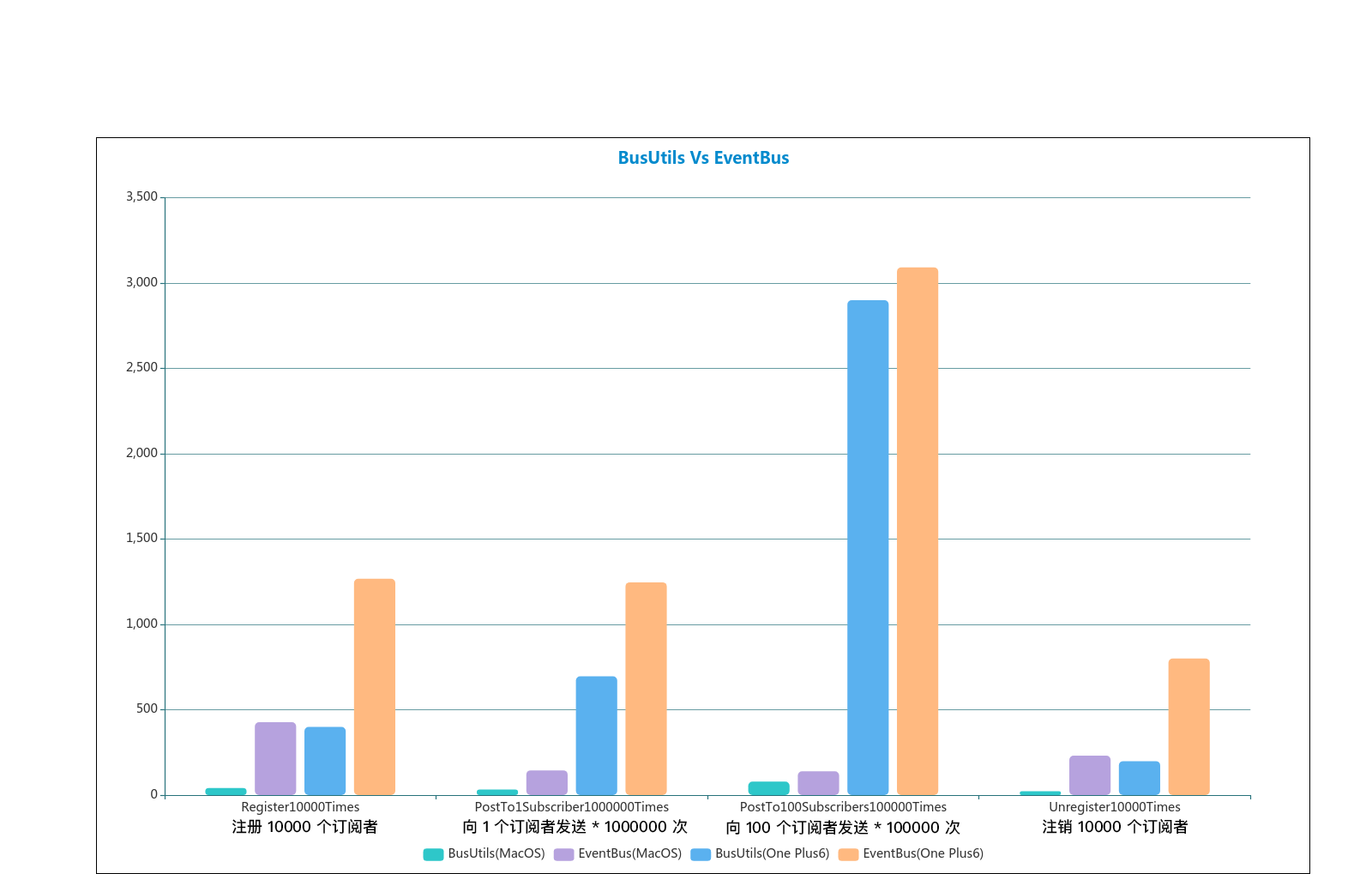
为了方便观察,我们生成一份图表来比较两者之间的性能:
|
|
|
|
|
|
|
2019-07-23 09:03:47 +08:00
|
|
|
|
|
2019-07-18 21:54:44 +08:00
|
|
|
|
|
|
|
|
|
|
图表中分别对四个函数在 MacOS 和 OnePlus6 中的表现进行统计,每个函数中从左向右分别是 「MacOS 的 BusUtils」、「MacOS 的 EventBus」、「OnePlus6 的 BusUtils」、「OnePlus6 的 EventBus」,可以发现,BusUtils 在注册和注销上基本比 `EventBus` 要快上好几倍,BusUtils 在向少量订阅者发送多次事件比 `EventBus` 也快上好多,在向多个订阅者发送多次事件也比 `EventBus` 快上些许。
|
|
|
|
|
|
|
2019-07-18 23:33:11 +08:00
|
|
|
|
基于以上说的这么多,如果你项目中事件总线用得比较频繁,那么可以试着用我的 `BusUtils` 来替代 `EventBus` 来提升性能,或者在新的项目中,你也可以直接使用性能更好的 `BusUtils`。
|
2019-07-18 21:54:44 +08:00
|
|
|
|
|
2019-07-18 23:33:11 +08:00
|
|
|
|
下面来总结下 `BusUtils` 的优点:
|
2019-07-18 22:21:33 +08:00
|
|
|
|
|
|
|
|
|
|
* `BusUtils` 是通过事件 `Tag` 来确定唯一事件的,所以接收函数支持无参或者一个参数,而 `EventBus` 只能通过 MessageEvent 来确定具体的接收者,只能接收一个参数,即便仅仅是通知,也需要定义一个 MessageEvent,所以,`BusUtils` 传参更灵活。
|
|
|
|
|
|
* `BusUtils` 在应用到项目中后,编译后便会在 application 中生成 `__bus__.json` 事件列表,如上生成的事件列表如下所示:
|
|
|
|
|
|
|
|
|
|
|
|
```json
|
|
|
|
|
|
{
|
|
|
|
|
|
"BusUtilsClass": "com.blankj.utilcode.util.BusUtils",
|
|
|
|
|
|
"rightBus": {
|
|
|
|
|
|
"noParamFun": "{ desc: com.blankj.utilcode.pkg.feature.bus.BusActivity#noParamFun(), threadMode: POSTING }",
|
|
|
|
|
|
"oneParamFun": "{ desc: com.blankj.utilcode.pkg.feature.bus.BusActivity#oneParamFun(java.lang.String param), threadMode: POSTING }"
|
|
|
|
|
|
},
|
|
|
|
|
|
"wrongBus": {}
|
|
|
|
|
|
}
|
|
|
|
|
|
```
|
|
|
|
|
|
|
2020-04-25 15:01:51 +08:00
|
|
|
|
修改 `oneParamFun` 为两个参数的话,为了确保项目不会因为 `BusUtils` 在运行时崩溃,`bus` 插件会使其在编译时就不过,此时 `__bus__.json` 文件如下所示,提示你参数个数不对:
|
2019-07-18 22:21:33 +08:00
|
|
|
|
|
|
|
|
|
|
```json
|
|
|
|
|
|
{
|
|
|
|
|
|
"BusUtilsClass": "com.blankj.utilcode.util.BusUtils",
|
|
|
|
|
|
"rightBus": {
|
|
|
|
|
|
"noParamFun": "{ desc: com.blankj.utilcode.pkg.feature.bus.BusActivity#noParamFun(), threadMode: POSTING }",
|
|
|
|
|
|
},
|
|
|
|
|
|
"wrongBus": {
|
|
|
|
|
|
"oneParamFun": "{ desc: com.blankj.utilcode.pkg.feature.bus.BusActivity#oneParamFun(java.lang.String param, java.lang.String param1), threadMode: POSTING, paramSize: 2 }"
|
|
|
|
|
|
}
|
|
|
|
|
|
```
|
|
|
|
|
|
|
2019-08-08 04:19:33 +08:00
|
|
|
|
~~同理,如果两个 bus 的 `Tag` 相同了,也会编译不过,提示你项目中存在 `Tag` 相同的 bus。~~(2.1 版本已支持 Tag 一对多及事件优先级)
|
2019-07-18 22:21:33 +08:00
|
|
|
|
|
|
|
|
|
|
所以,`BusUtils` 比 `EventBus` 更友好。
|
|
|
|
|
|
|
|
|
|
|
|
* `BusUtils` 比 `EventBus` 代码少得太多,`BusUtils` 的源码只有区区 300 行,而 `EventBus` 3000 行肯定是不止的哈。
|
2019-07-18 23:33:11 +08:00
|
|
|
|
* `BusUtils` 比 `EventBus` 性能更好。
|
2019-07-18 22:21:33 +08:00
|
|
|
|
|
2019-07-18 21:54:44 +08:00
|
|
|
|
|
|
|
|
|
|
## 原理
|
|
|
|
|
|
|
2019-07-18 23:33:11 +08:00
|
|
|
|
### bus 插件原理分析
|
2019-07-18 21:54:44 +08:00
|
|
|
|
|
2019-07-18 23:33:11 +08:00
|
|
|
|
bus 插件的源码在这里:[bus 插件源码传送门](https://github.com/Blankj/AndroidUtilCode/tree/master/plugin/bus-gradle-plugin),该插件通过 Gradle 的 transform 来完成对 `BusUtils.init()` 做注入,下面来一步步分析:
|
2019-07-18 21:54:44 +08:00
|
|
|
|
|
|
|
|
|
|
不明白 transform 的可以先去了解下,简单来说 transform 就是专门用来做字节码插入操作的,最常见的就是 AOP(面向切面编程),这部分我就不科普了,有兴趣的可以自己搜索了解。
|
|
|
|
|
|
|
|
|
|
|
|
说到字节码操作,那就又有知识点了,想要上手快速简单的可以使用 `javassist`,不过,我选择了更强大快速的 `ASM`,这里我就不详细介绍了,有兴趣的可以自己去学习,`ASM` 其实也很简单的,在 [ASM Bytecode Outline](https://plugins.jetbrains.com/plugin/5918-asm-bytecode-outline) 这个插件帮助下写得还是很快的。
|
|
|
|
|
|
|
|
|
|
|
|
通过 ASM 扫描出所有带有 `@BusUtils.Bus` 注解的函数,读取并保存注解的值和函数的参数信息,相关代码如下所示:
|
|
|
|
|
|
|
|
|
|
|
|
```java
|
|
|
|
|
|
@Override
|
|
|
|
|
|
public void visit(int version, int access, String name, String signature, String superName, String[] interfaces) {
|
|
|
|
|
|
className = name.replace("/", ".");
|
|
|
|
|
|
super.visit(version, access, name, signature, superName, interfaces);
|
|
|
|
|
|
}
|
|
|
|
|
|
|
|
|
|
|
|
@Override
|
|
|
|
|
|
public MethodVisitor visitMethod(int access, String funName, String desc, String signature, String[] exceptions) {
|
|
|
|
|
|
if (cv == null) return null;
|
|
|
|
|
|
MethodVisitor mv = cv.visitMethod(access, funName, desc, signature, exceptions);
|
|
|
|
|
|
busInfo = null;
|
|
|
|
|
|
mv = new AdviceAdapter(Opcodes.ASM5, mv, access, funName, desc) {
|
|
|
|
|
|
@Override
|
|
|
|
|
|
public AnnotationVisitor visitAnnotation(String desc1, boolean visible) {
|
|
|
|
|
|
final AnnotationVisitor av = super.visitAnnotation(desc1, visible);
|
|
|
|
|
|
if (("L" + mBusUtilsClass + "$Bus;").equals(desc1)) {
|
|
|
|
|
|
busInfo = new BusInfo(className, funName);
|
|
|
|
|
|
funParamDesc = desc.substring(1, desc.indexOf(")"));
|
|
|
|
|
|
return new AnnotationVisitor(Opcodes.ASM5, av) {
|
|
|
|
|
|
@Override
|
|
|
|
|
|
public void visit(String name, Object value) {// 可获取注解的值
|
|
|
|
|
|
super.visit(name, value);
|
|
|
|
|
|
if ("tag".equals(name)) {
|
|
|
|
|
|
tag = (String) value;
|
|
|
|
|
|
} else if ("sticky".equals(name) && (Boolean) value) {
|
|
|
|
|
|
busInfo.sticky = true;
|
|
|
|
|
|
}
|
|
|
|
|
|
}
|
|
|
|
|
|
@Override
|
|
|
|
|
|
public void visitEnum(String name, String desc, String value) {
|
|
|
|
|
|
super.visitEnum(name, desc, value);
|
|
|
|
|
|
if ("threadMode".equals(name)) {
|
|
|
|
|
|
busInfo.threadMode = value;
|
|
|
|
|
|
}
|
|
|
|
|
|
}
|
|
|
|
|
|
};
|
|
|
|
|
|
}
|
|
|
|
|
|
return av;
|
|
|
|
|
|
}
|
|
|
|
|
|
@Override
|
|
|
|
|
|
public void visitLocalVariable(String name, String desc, String signature, Label start, Label end, int index) {
|
|
|
|
|
|
super.visitLocalVariable(name, desc, signature, start, end, index);// 获取方法参数信息
|
|
|
|
|
|
if (busInfo != null && !funParamDesc.equals("")) {
|
|
|
|
|
|
if ("this".equals(name)) {
|
|
|
|
|
|
return;
|
|
|
|
|
|
}
|
|
|
|
|
|
funParamDesc = funParamDesc.substring(desc.length());// 每次去除参数直到为 "",那么之后的就不是参数了
|
|
|
|
|
|
busInfo.paramsInfo.add(new BusInfo.ParamsInfo(Type.getType(desc).getClassName(), name));
|
|
|
|
|
|
if (busInfo.isParamSizeNoMoreThanOne && busInfo.paramsInfo.size() > 1) {
|
|
|
|
|
|
busInfo.isParamSizeNoMoreThanOne = false;
|
|
|
|
|
|
}
|
|
|
|
|
|
}
|
|
|
|
|
|
}
|
|
|
|
|
|
@Override
|
|
|
|
|
|
public void visitEnd() {
|
|
|
|
|
|
super.visitEnd();
|
|
|
|
|
|
if (busInfo != null) {
|
|
|
|
|
|
List<BusInfo> infoList = mBusMap.get(tag);
|
|
|
|
|
|
if (infoList == null) {
|
|
|
|
|
|
infoList = new ArrayList<>();
|
|
|
|
|
|
mBusMap.put(tag, infoList);
|
|
|
|
|
|
} else if (infoList.size() == 0) {
|
|
|
|
|
|
mBusMap.put(tag, infoList);
|
|
|
|
|
|
} else if (infoList.size() == 1) {
|
|
|
|
|
|
BusInfo info0 = infoList.get(0);
|
|
|
|
|
|
info0.isTagRepeat = true;
|
|
|
|
|
|
busInfo.isTagRepeat = true;
|
|
|
|
|
|
} else {
|
|
|
|
|
|
busInfo.isTagRepeat = true;
|
|
|
|
|
|
}
|
|
|
|
|
|
infoList.add(busInfo);
|
|
|
|
|
|
}
|
|
|
|
|
|
}
|
|
|
|
|
|
};
|
|
|
|
|
|
return mv;
|
|
|
|
|
|
}
|
|
|
|
|
|
```
|
|
|
|
|
|
|
2019-07-18 23:33:11 +08:00
|
|
|
|
然后往 `BusUtils.init()` 插入扫描出来的内容,比如上面提到的 `oneParamFun` 这个函数,那么其最终插入的代码如下所示:
|
2019-07-18 21:54:44 +08:00
|
|
|
|
|
|
|
|
|
|
```java
|
|
|
|
|
|
|
|
|
|
|
|
private void init() {
|
|
|
|
|
|
this.registerBus("TagOneParam", "com.blankj.bus.BusTest", "oneParamFun", "java.lang.String", "param", false, "POSTING");
|
|
|
|
|
|
}
|
|
|
|
|
|
```
|
|
|
|
|
|
|
2019-07-18 23:33:11 +08:00
|
|
|
|
其 ASM 插入的代码如下所示:
|
|
|
|
|
|
|
|
|
|
|
|
```java
|
|
|
|
|
|
@Override
|
|
|
|
|
|
public MethodVisitor visitMethod(int access, String name, String descriptor, String signature, String[] exceptions) {
|
|
|
|
|
|
if (!"init".equals(name)) {
|
|
|
|
|
|
return super.visitMethod(access, name, descriptor, signature, exceptions);
|
|
|
|
|
|
}
|
|
|
|
|
|
// 往 init() 函数中写入
|
|
|
|
|
|
if (cv == null) return null;
|
|
|
|
|
|
MethodVisitor mv = cv.visitMethod(access, name, descriptor, signature, exceptions);
|
|
|
|
|
|
mv = new AdviceAdapter(Opcodes.ASM5, mv, access, name, descriptor) {
|
|
|
|
|
|
@Override
|
|
|
|
|
|
public AnnotationVisitor visitAnnotation(String desc, boolean visible) {
|
|
|
|
|
|
return super.visitAnnotation(desc, visible);
|
|
|
|
|
|
}
|
|
|
|
|
|
@Override
|
|
|
|
|
|
protected void onMethodEnter() {
|
|
|
|
|
|
super.onMethodEnter();
|
|
|
|
|
|
}
|
|
|
|
|
|
@Override
|
|
|
|
|
|
protected void onMethodExit(int opcode) {
|
|
|
|
|
|
super.onMethodExit(opcode);
|
|
|
|
|
|
for (Map.Entry<String, List<BusInfo>> busEntry : mBusMap.entrySet()) {
|
|
|
|
|
|
List<BusInfo> infoList = busEntry.getValue();
|
|
|
|
|
|
if (infoList.size() != 1) continue;
|
|
|
|
|
|
BusInfo busInfo = infoList.get(0);
|
|
|
|
|
|
if (!busInfo.isParamSizeNoMoreThanOne) continue;
|
|
|
|
|
|
mv.visitVarInsn(ALOAD, 0);
|
|
|
|
|
|
mv.visitLdcInsn(busEntry.getKey());
|
|
|
|
|
|
mv.visitLdcInsn(busInfo.className);
|
|
|
|
|
|
mv.visitLdcInsn(busInfo.funName);
|
|
|
|
|
|
if (busInfo.paramsInfo.size() == 1) {
|
|
|
|
|
|
mv.visitLdcInsn(busInfo.paramsInfo.get(0).className);
|
|
|
|
|
|
mv.visitLdcInsn(busInfo.paramsInfo.get(0).name);
|
|
|
|
|
|
} else {
|
|
|
|
|
|
mv.visitLdcInsn("");
|
|
|
|
|
|
mv.visitLdcInsn("");
|
|
|
|
|
|
}
|
|
|
|
|
|
mv.visitInsn(busInfo.sticky ? ICONST_1 : ICONST_0);
|
|
|
|
|
|
mv.visitLdcInsn(busInfo.threadMode);
|
|
|
|
|
|
mv.visitMethodInsn(INVOKESPECIAL, mBusUtilsClass, "registerBus", "(Ljava/lang/String;Ljava/lang/String;Ljava/lang/String;Ljava/lang/String;Ljava/lang/String;ZLjava/lang/String;)V", false);
|
|
|
|
|
|
}
|
|
|
|
|
|
}
|
|
|
|
|
|
};
|
|
|
|
|
|
return mv;
|
|
|
|
|
|
}
|
|
|
|
|
|
```
|
|
|
|
|
|
|
|
|
|
|
|
### BusUtils 原理分析
|
|
|
|
|
|
|
|
|
|
|
|
接下来看下 `BusUtils.registerBus` 的实现:
|
2019-07-18 21:54:44 +08:00
|
|
|
|
|
|
|
|
|
|
```java
|
|
|
|
|
|
private void registerBus(String tag,
|
|
|
|
|
|
String className, String funName, String paramType, String paramName,
|
|
|
|
|
|
boolean sticky, String threadMode) {
|
|
|
|
|
|
mTag_BusInfoMap.put(tag, new BusInfo(className, funName, paramType, paramName, sticky, threadMode));
|
|
|
|
|
|
}
|
|
|
|
|
|
```
|
|
|
|
|
|
|
2019-07-18 22:21:33 +08:00
|
|
|
|
很简单,就是往 `mTag_BusInfoMap` 中插入了 key 为 `tag`,value 为 `BusInfo` 的一个实例,这样便把一个事件保留了下来。
|
2019-07-18 21:54:44 +08:00
|
|
|
|
|
|
|
|
|
|
接下来就是使用了,一开始我们都是先 register,源码如下所示:
|
|
|
|
|
|
|
|
|
|
|
|
```java
|
|
|
|
|
|
public static void register(final Object bus) {
|
|
|
|
|
|
getInstance().registerInner(bus);
|
|
|
|
|
|
}
|
|
|
|
|
|
|
|
|
|
|
|
private void registerInner(final Object bus) {
|
|
|
|
|
|
if (bus == null) return;
|
|
|
|
|
|
String className = bus.getClass().getName();
|
|
|
|
|
|
synchronized (mClassName_BusesMap) {
|
|
|
|
|
|
Set<Object> buses = mClassName_BusesMap.get(className);
|
|
|
|
|
|
if (buses == null) {
|
|
|
|
|
|
buses = new CopyOnWriteArraySet<>();
|
|
|
|
|
|
mClassName_BusesMap.put(className, buses);
|
|
|
|
|
|
}
|
|
|
|
|
|
buses.add(bus);
|
|
|
|
|
|
}
|
|
|
|
|
|
processSticky(bus);
|
|
|
|
|
|
}
|
|
|
|
|
|
```
|
|
|
|
|
|
|
|
|
|
|
|
我们获取 bus 的类名,然后对 `mClassName_BusesMap` 加锁来把它插入到 `mClassName_BusesMap` 的 value 的集合中,可以看到我们用了线程安全的 `CopyOnWriteArraySet` 集合,然后还需要处理下之前是否订阅过粘性事件 `processSticky`,到这里 register 便结束了。
|
|
|
|
|
|
|
2019-07-18 22:21:33 +08:00
|
|
|
|
然后就是 `post` 来发送事件了,源码如下:
|
2019-07-18 21:54:44 +08:00
|
|
|
|
|
|
|
|
|
|
```java
|
|
|
|
|
|
public static void post(final String tag) {
|
|
|
|
|
|
post(tag, NULL);
|
|
|
|
|
|
}
|
|
|
|
|
|
|
|
|
|
|
|
public static void post(final String tag, final Object arg) {
|
|
|
|
|
|
getInstance().postInner(tag, arg);
|
|
|
|
|
|
}
|
|
|
|
|
|
|
|
|
|
|
|
private void postInner(final String tag, final Object arg) {
|
|
|
|
|
|
postInner(tag, arg, false);
|
|
|
|
|
|
}
|
|
|
|
|
|
|
|
|
|
|
|
private void postInner(final String tag, final Object arg, final boolean sticky) {
|
|
|
|
|
|
BusInfo busInfo = mTag_BusInfoMap.get(tag);
|
|
|
|
|
|
if (busInfo == null) {
|
|
|
|
|
|
Log.e(TAG, "The bus of tag <" + tag + "> is not exists.");
|
|
|
|
|
|
return;
|
|
|
|
|
|
}
|
|
|
|
|
|
if (busInfo.method == null) {
|
|
|
|
|
|
Method method = getMethodByBusInfo(busInfo);
|
|
|
|
|
|
if (method == null) {
|
|
|
|
|
|
return;
|
|
|
|
|
|
}
|
|
|
|
|
|
busInfo.method = method;
|
|
|
|
|
|
}
|
|
|
|
|
|
invokeMethod(tag, arg, busInfo, sticky);
|
|
|
|
|
|
}
|
|
|
|
|
|
|
|
|
|
|
|
private Method getMethodByBusInfo(BusInfo busInfo) {
|
|
|
|
|
|
try {
|
|
|
|
|
|
if ("".equals(busInfo.paramType)) {
|
|
|
|
|
|
return Class.forName(busInfo.className).getDeclaredMethod(busInfo.funName);
|
|
|
|
|
|
} else {
|
|
|
|
|
|
return Class.forName(busInfo.className).getDeclaredMethod(busInfo.funName, Class.forName(busInfo.paramType));
|
|
|
|
|
|
}
|
|
|
|
|
|
} catch (ClassNotFoundException e) {
|
|
|
|
|
|
e.printStackTrace();
|
|
|
|
|
|
} catch (NoSuchMethodException e) {
|
|
|
|
|
|
e.printStackTrace();
|
|
|
|
|
|
}
|
|
|
|
|
|
return null;
|
|
|
|
|
|
}
|
|
|
|
|
|
|
|
|
|
|
|
private void invokeMethod(final String tag, final Object arg, final BusInfo busInfo, final boolean sticky) {
|
|
|
|
|
|
Runnable runnable = new Runnable() {
|
|
|
|
|
|
@Override
|
|
|
|
|
|
public void run() {
|
|
|
|
|
|
realInvokeMethod(tag, arg, busInfo, sticky);
|
|
|
|
|
|
}
|
|
|
|
|
|
};
|
|
|
|
|
|
switch (busInfo.threadMode) {
|
|
|
|
|
|
case "MAIN":
|
|
|
|
|
|
Utils.runOnUiThread(runnable);
|
|
|
|
|
|
return;
|
|
|
|
|
|
case "IO":
|
|
|
|
|
|
ThreadUtils.getIoPool().execute(runnable);
|
|
|
|
|
|
return;
|
|
|
|
|
|
case "CPU":
|
|
|
|
|
|
ThreadUtils.getCpuPool().execute(runnable);
|
|
|
|
|
|
return;
|
|
|
|
|
|
case "CACHED":
|
|
|
|
|
|
ThreadUtils.getCachedPool().execute(runnable);
|
|
|
|
|
|
return;
|
|
|
|
|
|
case "SINGLE":
|
|
|
|
|
|
ThreadUtils.getSinglePool().execute(runnable);
|
|
|
|
|
|
return;
|
|
|
|
|
|
default:
|
|
|
|
|
|
runnable.run();
|
|
|
|
|
|
}
|
|
|
|
|
|
}
|
|
|
|
|
|
|
|
|
|
|
|
private void realInvokeMethod(final String tag, Object arg, BusInfo busInfo, boolean sticky) {
|
|
|
|
|
|
Set<Object> buses = mClassName_BusesMap.get(busInfo.className);
|
|
|
|
|
|
if (buses == null || buses.size() == 0) {
|
|
|
|
|
|
if (!sticky) {
|
|
|
|
|
|
Log.e(TAG, "The bus of tag <" + tag + "> was not registered before.");
|
|
|
|
|
|
return;
|
|
|
|
|
|
} else {
|
|
|
|
|
|
return;
|
|
|
|
|
|
}
|
|
|
|
|
|
}
|
|
|
|
|
|
try {
|
|
|
|
|
|
if (arg == NULL) {
|
|
|
|
|
|
for (Object bus : buses) {
|
|
|
|
|
|
busInfo.method.invoke(bus);
|
|
|
|
|
|
}
|
|
|
|
|
|
} else {
|
|
|
|
|
|
for (Object bus : buses) {
|
|
|
|
|
|
busInfo.method.invoke(bus, arg);
|
|
|
|
|
|
}
|
|
|
|
|
|
}
|
|
|
|
|
|
} catch (IllegalAccessException e) {
|
|
|
|
|
|
e.printStackTrace();
|
|
|
|
|
|
} catch (InvocationTargetException e) {
|
|
|
|
|
|
e.printStackTrace();
|
|
|
|
|
|
}
|
|
|
|
|
|
}
|
|
|
|
|
|
```
|
|
|
|
|
|
|
2019-07-18 22:21:33 +08:00
|
|
|
|
可以看到代码还是比较多的,不过别急,我们一步步来还是很简单的,首先在我们之前注入的 `mTag_BusInfoMap` 中查找是否有该 `tag` 的 `BusInfo`,没有的话就输出错误日志直接返回。
|
2019-07-18 21:54:44 +08:00
|
|
|
|
|
|
|
|
|
|
然后我们根据获取到的 `BusInfo` 来找到 `method` 实例,`BusInfo` 第一次会把 `method` 保存在实例中,之后调用的话直接从实例中取出 `method` 即可。
|
|
|
|
|
|
|
|
|
|
|
|
接着我们从 `BusInfo` 中取出线程信息,最后在线程中执行 `method` 的反射,大体就是这样,具体细节的话还是需要自己分析源码。
|
|
|
|
|
|
|
|
|
|
|
|
最后就是 `unregister` 了:
|
|
|
|
|
|
|
|
|
|
|
|
```java
|
|
|
|
|
|
public static void unregister(final Object bus) {
|
|
|
|
|
|
getInstance().unregisterInner(bus);
|
|
|
|
|
|
}
|
|
|
|
|
|
|
|
|
|
|
|
private void unregisterInner(final Object bus) {
|
|
|
|
|
|
if (bus == null) return;
|
|
|
|
|
|
String className = bus.getClass().getName();
|
|
|
|
|
|
synchronized (mClassName_BusesMap) {
|
|
|
|
|
|
Set<Object> buses = mClassName_BusesMap.get(className);
|
|
|
|
|
|
if (buses == null || !buses.contains(bus)) {
|
|
|
|
|
|
Log.e(TAG, "The bus of <" + bus + "> was not registered before.");
|
|
|
|
|
|
return;
|
|
|
|
|
|
}
|
|
|
|
|
|
buses.remove(bus);
|
|
|
|
|
|
}
|
|
|
|
|
|
}
|
|
|
|
|
|
```
|
|
|
|
|
|
|
2019-08-08 04:19:33 +08:00
|
|
|
|
`unregister` 和 `register` 相反,就是从 `mClassName_BusesMap` 的 value 集合中移除,同样需要对 `mClassName_BusesMap` 加锁哦。
|
|
|
|
|
|
|
|
|
|
|
|
|
|
|
|
|
|
## [Change Log](https://github.com/Blankj/AndroidUtilCode/blob/master/plugin/bus-gradle-plugin/CHANGELOG.md)
|


