**Caire** is a content aware image resize library based on *[Seam Carving for Content-Aware Image Resizing](https://inst.eecs.berkeley.edu/~cs194-26/fa16/hw/proj4-seamcarving/imret.pdf)* paper.
* Using a dynamic programming approach the algorithm will generate individual seams across the image from top to down, or from left to right (depending on the horizontal or vertical resizing) and will allocate for each seam a custom value, the least important pixels having the lowest energy cost and the most important ones having the highest cost.
* We traverse the image from the second row to the last row and compute the cumulative minimum energy for all possible connected seams for each entry.
* The minimum energy level is calculated by summing up the current pixel value with the lowest value of the neighboring pixels obtained from the previous row.
* We traverse the image from top to bottom and compute the minimum energy level. For each pixel in a row we compute the energy of the current pixel plus the energy of one of the three possible pixels above it.
The library is capable of detecting human faces prior resizing the images by using the lightweight Pigo (https://github.com/esimov/pigo) face detection library.
The image below illustrates the application capabilities for human face detection prior resizing. It's clearly visible that with face detection activated the algorithm will avoid cropping pixels inside the detected faces, retaining the face zone unaltered.
| Original image | With face detection | Without face detection
|:--:|:--:|:--:|
|  | 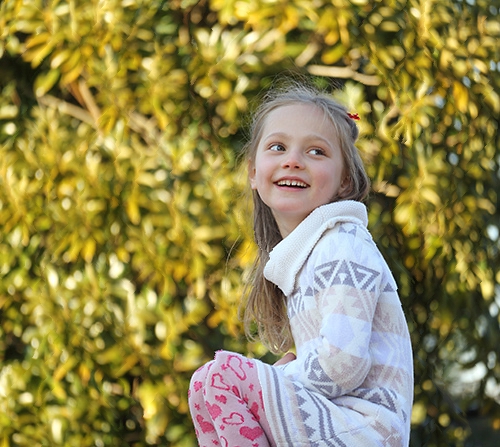 | 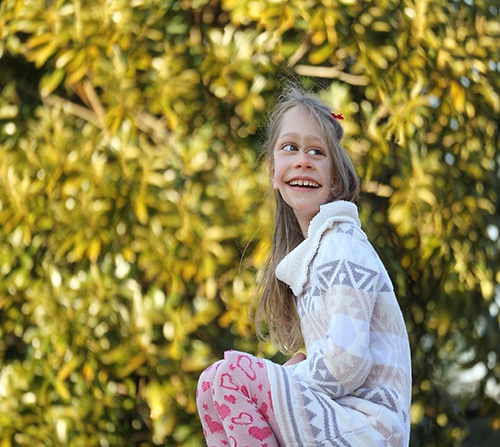 |
A GUI preview mode is also incorporated into the library for in time process visualization. The [Gio](http://gioui.org/) GUI library has been used because of its robustness and modern architecture. Prior running it please make sure that you have installed all the required dependencies noted in the installation section (https://gioui.org/#installation) .
The preview window is activated by default but you can deactivate it any time by setting the `-preview` flag to false. When the images are processed concurrently from a directory the preview mode is deactivated.
In order to detect faces prior rescaling, use the `-face` flag. There is no need to provide a face classification file, since it's already embedded into the generated binary file. The sample code below will resize the provided image with 20%, but checks for human faces in order tot avoid face deformations.
You can provide also an image URL for the `-in` flag or even use **curl** or **wget** as a pipe command in which case there is no need to use the `-in` flag.
The library can also process multiple images from a directory **concurrently**. You have to provide only the source and the destination folder and the new width or height in this case.
In case you wish to scale down the image by a specific percentage, it can be used the **`-perc`** boolean flag. In this case the values provided for the `width` and `height` are expressed in percentage and not pixel values. For example to reduce the image dimension by 20% both horizontally and vertically you can use the following command:
When an image is resized on both the X and Y axis, the algorithm will first try to rescale it prior resizing, but also will preserve the image aspect ratio. The seam carving algorithm is applied only to the remaining points. Ex. : given an image of dimensions 2048x1536 if we want to resize to the 1024x500, the tool first rescale the image to 1024x768 and then will remove only the remaining 268px.
-`-mask`: The path to the protective mask. The mask should be in binary format and have the same size as the input image. White areas represent regions where no seams should be carved.
-`-rmask`: The path to the removal mask. The mask should be in binary format and have the same size as the input image. White areas represent regions to be removed.


